




If you’ve sat in a friend’s car and noticed their phone screen mirrored neatly onto the dashboard, you’ve seen Apple CarPlay in action. It’s quietly become one of the most requested upgrades we see at NZ Desi, and for good reason — it turns a car’s stock stereo into something that actually keeps up with how people use their phones every day. This blog breaks down what Apple CarPlay is, why Kiwi drivers are retrofitting it into older vehicles, and what to think about before you book an install.
What Exactly Is Apple CarPlay?
Apple CarPlay is a feature built into iPhones that projects a simplified, driver-friendly version of your phone’s interface onto your car’s touchscreen. Instead of fumbling with a tiny phone screen at a red light, you get large icons, voice control through Siri, and access to maps, music, messages, and calls — all on a screen designed for glancing, not staring. For the full technical rundown on how the system was developed and how it has evolved, Apple’s own documentation and the CarPlay Wikipedia page are worth a read.
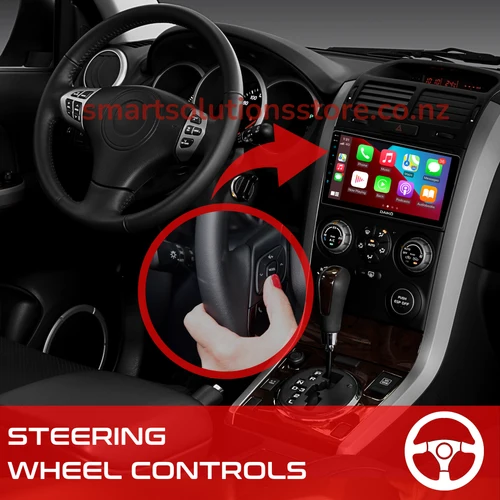
What makes Apple CarPlay different from just mounting your phone on the dash is integration. It talks to your car’s built-in controls — steering wheel buttons, rotary dials, voice command buttons — so you’re not touching your phone at all once you’re moving. That’s a meaningful safety upgrade on its own.
Why Are So Many Drivers Retrofitting Apple CarPlay?
Most new vehicles come with Apple CarPlay standard now, but the reality in New Zealand is that a huge number of cars on the road are ten, fifteen, even twenty years old — especially the popular Japanese imports. Those cars have perfectly good engines and interiors, but the factory stereo is stuck in the 2000s. Retrofitting solves that mismatch without having to buy a new car.
Here’s why people choose to add Apple CarPlay to an older vehicle:
- Safer navigation — Google Maps or Apple Maps on a dash-mounted screen beats squinting at a phone propped on the dashboard
- Hands-free everything — Siri handles texts, calls, and music requests without you touching a button
- Better resale value — a modernised interior makes a used car noticeably more appealing to buyers
- Music without limits — Spotify, Apple Music, podcasts, and audiobooks all run through CarPlay natively
- No subscription needed — unlike some built-in nav systems, CarPlay uses your phone’s data and apps, so there’s nothing extra to pay for
- Wireless options available — many modern aftermarket units connect to your iPhone automatically the moment you start the car
How Does an Apple CarPlay Install Actually Work?
A CarPlay retrofit usually means replacing the factory head unit with an aftermarket multimedia unit that supports Apple CarPlay, either wired or wireless. The new unit is matched to your car’s dash size and wiring harness, so the finished result looks factory-fitted rather than bolted on. A professional installer will also make sure your steering wheel controls, reverse camera input, and any existing sensors are wired through correctly, so nothing stops working after the upgrade.
This is also a smart time to think about what else plugs into that new screen. Many of our customers pair their Apple CarPlay unit with a Reversing Cameras setup, since the bigger, brighter display makes reverse footage far easier to see than a factory-standard screen ever could. If you’re curious about getting the clearest possible footage from front and rear angles, our guide on the best front and rear dash cam setups is a useful next read.

What Should You Check Before Booking an Apple CarPlay Install?
Not every install is identical, and a few details matter more than people expect:
- Wired vs wireless CarPlay — wired is generally more stable and cheaper, wireless is more convenient but relies on a solid Bluetooth and Wi-Fi connection
- Screen size and dash fit — units range from 7-inch to 10-inch-plus, and not every size suits every dashboard without a custom fascia
- Camera compatibility — confirm the new unit supports your existing or planned Parking Sensors and reverse camera inputs
- Steering wheel control retention — a proper install keeps your existing buttons functional
- Warranty and support — ask what’s covered if the unit has a fault down the track
- GPS antenna needs — some units need a dedicated GPS aerial for accurate mapping, separate from your phone’s own GPS
Apple CarPlay and the Rest of Your Car’s Security Setup
Once you’ve upgraded the entertainment side of your car, it’s worth looking at the bigger picture. A new head unit is a visible, valuable addition to your vehicle, so pairing it with solid security makes sense. Our piece on car alarm installation covers what to look for in an alarm system that protects your whole vehicle, not just the new screen you’ve just installed.
It’s also common for customers upgrading their stereo to tick off a few other jobs at the same time, since an installer is already working under the dash. Popular add-ons include Gps Tracking for peace of mind if the car is ever stolen, Dashcams for insurance and evidence purposes, a Hand Brake Alarm as an extra anti-theft deterrent, and even window Tinting to keep the cabin cooler and add privacy. None of these are required alongside an Apple CarPlay install, but bundling jobs together often saves time and callout costs.
Is Apple CarPlay Worth It for an Older Car?
For most drivers, yes. The cost of retrofitting Apple CarPlay is a fraction of buying a newer car, and the day-to-day difference is bigger than people expect — safer navigation, hands-free calls, and a stereo that finally matches how you actually use your phone. It’s one of the few upgrades that improves both the driving experience and the resale value of the vehicle at the same time.
FAQs
Q. What is Apple CarPlay used for?
Apple CarPlay is used to safely access your iPhone’s navigation, music, messaging, and calling features through your car’s dashboard screen, reducing the need to handle your phone while driving.
Q. Why does my car not have Apple CarPlay?
Older vehicles were built before CarPlay existed or before manufacturers made it standard. A retrofit multimedia unit adds the feature to almost any car with a compatible dash opening.
Q. How much does it cost to add Apple CarPlay to an older car?
Pricing varies by unit and vehicle, generally depending on screen size, wired versus wireless capability, and whether a custom fascia is needed for your dashboard.
Q. Which is better, wired or wireless Apple CarPlay?
Wired CarPlay tends to be more stable and budget-friendly, while wireless CarPlay offers more convenience since your phone connects automatically without a cable.
Q. Can Apple CarPlay work with a reversing camera?
Yes, most aftermarket Apple CarPlay units support a reversing camera input, displaying the feed directly on the larger touchscreen for a clearer view than a factory display.
Q. Where can I get Apple CarPlay installed in Auckland?
NZ Desi offers free onsite installation across Auckland for Apple CarPlay units, along with related upgrades like reversing cameras, parking sensors, and dash cams.
0 Comments